With the digitalization of the human resources department and the desire to improve process management, the question arises: can we automate certain actions within the HR function? If HR professionals are already equipped with intelligent digital HR software, the next step is to connect these software to each other to create automatic and autonomous processes that would trigger a sequence of actions, i.e. workflows. This can be the difference between mediocre and effective onboarding processes and beyond. This is precisely what PeopleSpheres proposes with its cross-apps workflow system.
For a better understanding of workflows this article provides a definition and 5 examples to implement.
Related articles:
Best-Of-Breed vs All-In-One vs EXP: which solution for your HRIS?
Embracing HR Digital Transformation
What is a Workflow?
Globally, a workflow is known as the automation of a logical sequence of tasks created for better efficiency and process improvement. In the human resources field, a cross-module workflow system is a digital process that starts automatically from the HRIS Core and operates through the different connected smart modules of the HR functions. Thus, it makes it possible to automate a series of actions usually implemented manually by an HR professional. Thanks to these cross-module workflows, an HR professional can seamlessly carry out a series of automated actions in one click using various HR software. A significant amount of time is too often lost with burdensome clerical work. For example, with a workflow management system, an HR professional sets off a task to the right person at the right moment, and once a form is filled, they will automatically receive it back to approve.
Does it still seem a little vague to you? Let’s take a concrete example. To facilitate the arrival of a new employee in the company, the HR professional generally follows a well-defined protocol. We call it called “Preboarding” in HR vocabulary, i.e., the integration process before the new recruit starts. Preboarding requires many tasks carried out digitally, at least for companies already equipped with HR software. These digital tasks include, for example, distributing various administrative forms to be filled in by the new employee, such as contact details or bank details. The HR department has to reproduce so many actions for each new employee. It can quickly become monotonous and repetitive. For HR professionals to avoid repeating the same clicks each time, we can propose installing a workflow to automate these tasks. Establishing intuitive workflow systems will not only optimize an HR person’s working time but also prevent them from forgetting anything.
If a workflow can be established within the same software, for instance within a software specialized in compensation, a cross-module workflow can also be established between multiple software at the same time. In other words, if your HR department uses various software such as payroll, expense management software, or planning software at the same time, you can create a workflow that uses these different modules with a PaaS like PeopleSpheres. Indeed, you won’t be able to connect your various existing HR software on a single platform without a Core HR which is also part of the PeopleSpheres solution. Once you are equipped with a Core HR, these workflow engines are easy to use and are conceived so that you can create logical sequences of actions between your different HR modules.
By automating your processes with integrated workflows, your HR team can finally get rid of administrative and time-consuming tasks and focus on the essentials: recruitment, development, and talent management.
5 Workflows to Simplify Your Life as an HR Professional
Preboarding workflow
The arrival of a new employee creates a lot of movement within a company and between its different departments. The workload is significant. It requires attention from the HR department, the accounting department, managers, and other participants. The preparation of the arrival of a new employee is done before he or she arrives in the company; this is what we call the Preboarding process. Indeed, before his first day of work, the recruit is in charge of filling out various forms, reading the new policies, transmitting his personal information, creating his professional e-mail address, etc. With our workflow automation, everything is put in order beforehand, alleviating task management where form approvals are done faster with just a few clicks. The recruit is then ready for his first day.
The Preboarding workflow automation would then proceed as follows:
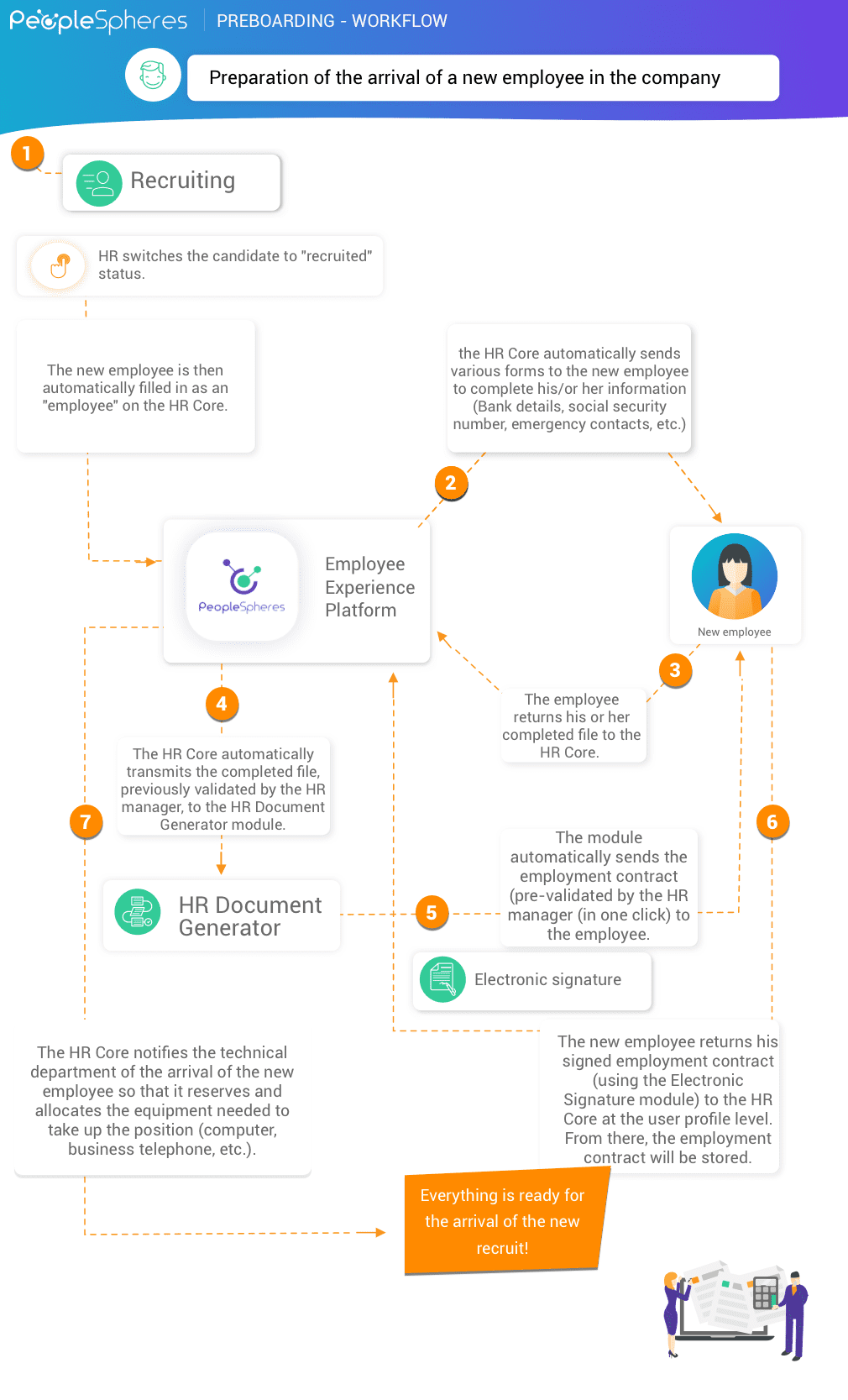
Event: the arrival of a new employee in the company
Action 1: With a Recruiting module, HR switches the candidate to “recruited” status. The new employee is then automatically filled in as an “employee” on the Core HR. All the information he had entered on his candidate file (generally containing his identity, address, marital status, telephone number, references) is automatically integrated into their employee file. This streamlined process eliminates data redundancy and reduces paperwork, allowing HR teams to focus on more strategic tasks, such as onboarding and talent development. You can also compress PDF document files, like employee documents, for secure storage and efficient sharing.
Action 2: To complete its employee form, the Core HR automatically sends various forms to the new employee to complete his/or her information (bank details, social security number, emergency contacts, etc.)
Action 3: The employee returns his or her completed file to the Core HR.
Action 4: The Core HR automatically transmits the completed file, previously validated by HR, to the HR Document Generator module.
Action 5: From the new employee’s file, the HR Document Generator module automatically sends the employment contract (pre-validated by the HR manager) to the employee.
Action 6: The new employee returns his signed employment contract (using the Electronic Signature module) to the Core HR at the user profile level. There, the employment contract is stored and protected.
Action 7: The Core HR notifies the technical department of the arrival of the new employee so that it reserves and allocates the equipment needed to take up the position (computer, business telephone, etc.).
Optional:
Action 8: The HRIS Core notifies the Training module of the arrival of the new employee, and onboarding training is then automatically assigned to him.
This way, the process is already ready, and the HR manager no longer has to worry!
Onboarding workflow
Event: the arrival of the recruit in the company
Action 1: The Core HR automatically generates an onboarding interview between the recruit and the HR department.
Action 2: The Core HR automatically generates an onboarding interview between the recruit and his/her assigned manager.
Action 3: The Core HR automatically notifies the HR professional, the manager, and the employee of the onboarding interview (date, schedule, etc)
Action 4: The Core HR notifies the Training module of the arrival of a recruit so that it can assign them an e-learning training path.

Offboarding workflow
Offboarding is an HR process that, as its name suggests, is the exact opposite of onboarding: it refers to the time when the employee leaves the company. The goal is to make sure that the separation goes as smoothly as possible and facilitates the employee’s departure.
Like onboarding, offboarding requires a series of precise steps. It is entirely possible to automate these steps. However, we have to assume that the procedure was followed and that the termination of the contract was conducted without litigation.
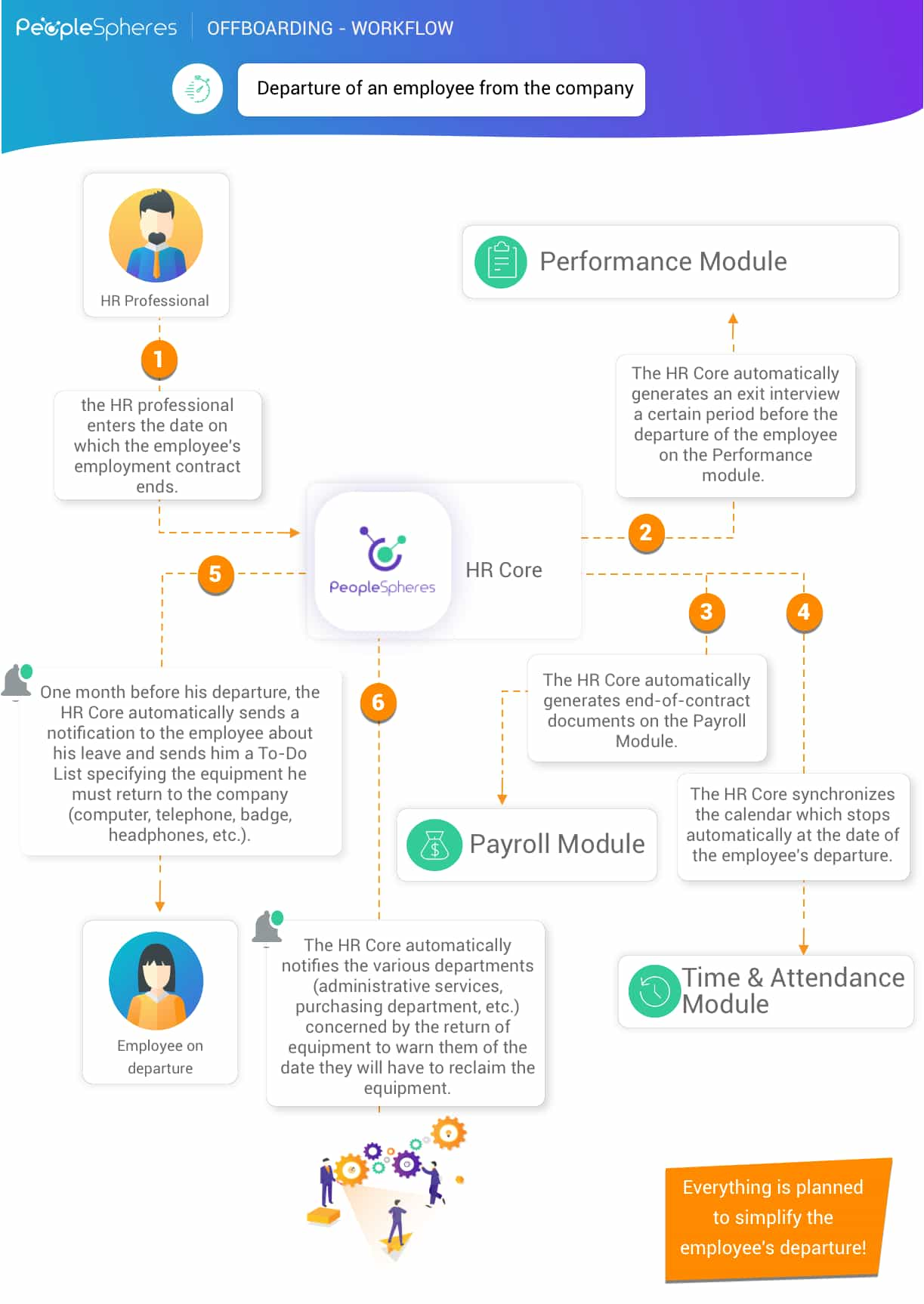
Event: Departure of an employee from the company
Action 1: In the Core HR, the HR professional enters the date on which the employee’s employment contract ends.
Action 2: The Core HR automatically generates an exit interview a certain period before the departure of the employee on the Performance module.
Action 3: The Core HR automatically generates end-of-contract documents on the Payroll module.
Action 4: The Core HR automatically synchronizes the Time & Attendance module with the employee’s departure date so that the employee’s calendar stops automatically when the employee leaves the company. It will automatically deactivate the profile.
Action 5: One month before his departure, the Core HR automatically sends a notification to the employee about their leave and sends them a to-do list specifying the equipment they must return to the company (computer, telephone, badge, headphones, etc.).
Action 6: The Core HR automatically notifies the various departments (administrative services, purchasing department, etc.) concerned by the return of equipment to inform them of the date they will have to reclaim the equipment.
Workflow at the end of the trial period
The trial period allows new employees and the company to give themselves time to verify that they have made the right choice. As the end of the trial period approaches, it usually triggers the same mechanisms, such as scheduling an end-of-trial interview or verifying that the new employee’s objectives have been met.
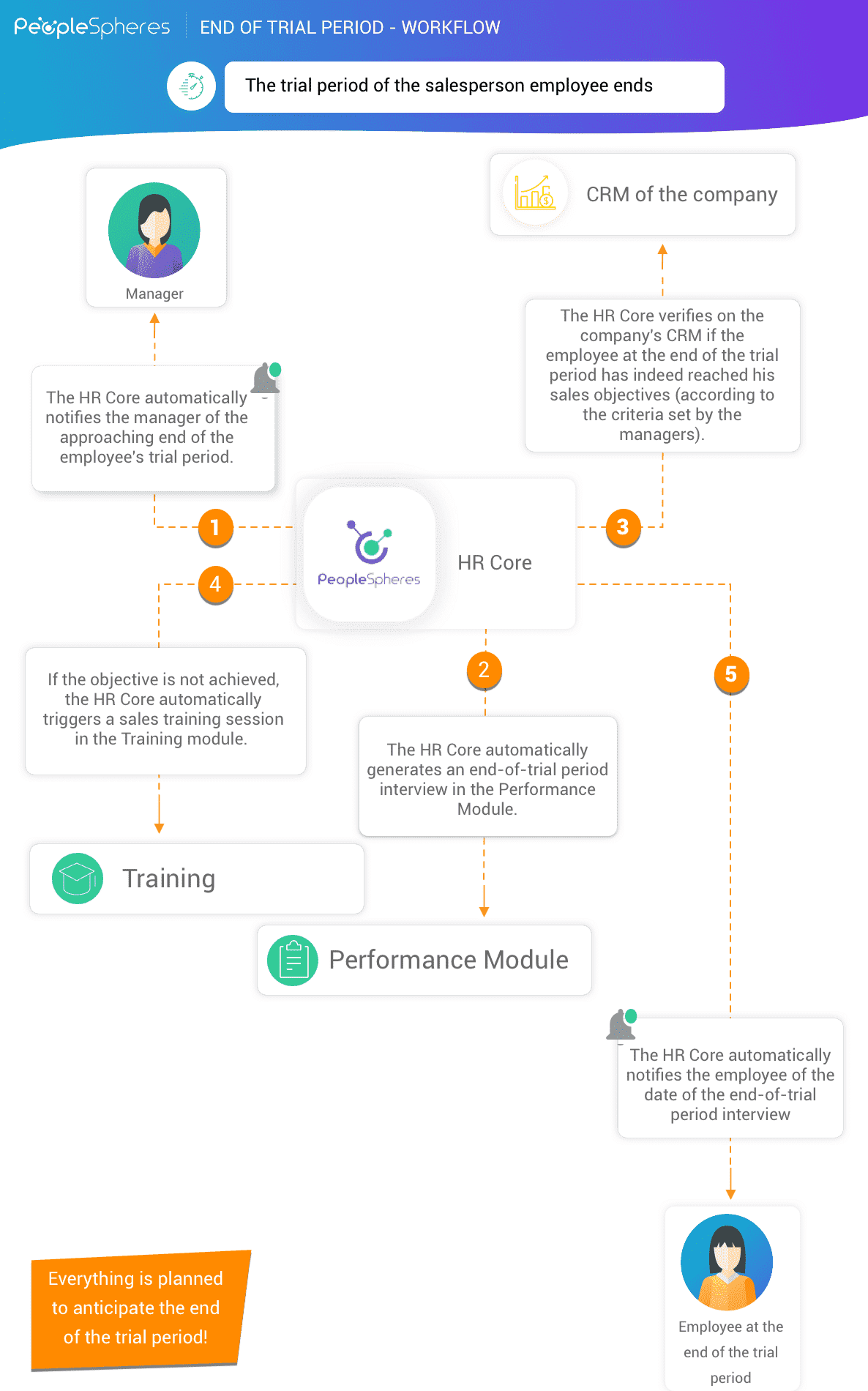
Event: the employee’s trial period ends, and a new workflow process is launched
Action 1: Beforehand, the Core HR automatically notifies the manager that the end of the employee’s trial period is approaching.
Action 2: The Core HR automatically generates an end-of-trial period interview in the Performance Management module.
Action 3: If the sales department decided to set a minimum objective for the employee’s trial period (let us say a salesperson must have at least 20 opportunities in his pipe) then the Core HR launches an audit on the company’s omnichannel CRM to verify whether the objective has been achieved.
Action 4: If the objective is not achieved, the Core HR automatically triggers a training in the connected Training module.
Action 5: The Core HR automatically notifies the employee of the date of the end-of-trial period interview and informs him/or her of the potential training put in place.
Time off workflow
Leave management is a crucial mission for HR professionals. The cross-module Leave & Absence workflow launches and automates sequential actions from the “leave request” process to its implementation.
Event: Employee needs to take a leave of absence
Action 1: The employee submits a leave request on the Leave & Absences module. From here, he or she has the choice between an unpaid leave or a paid leave and can attach supporting documents in the request.
Action 2: The request is automatically transmitted to the manager, either by email or with a notification directly accessible in the Core HR (which prevents the manager from wasting time connecting to the Leave & Absence module)
Action 3: If the request is approved by the manager, the Core HR automatically sends it to the HR department, who then reviews it.
Action 4: Once the absence is approved, the Planning module is updated and takes into account the employee’s absence. Consequently, the employee’s attendance schedule is changed accordingly.
Action 5: If leave is unpaid, the Payroll module is updated, and the employee’s salary is automatically modified in agreement. In technical terms, an excel export of the leave is transmitted to your Payroll module which is then imported automatically.
Digitalization is now embracing the HR function, and the automation of HR processes is proving to be an essential strategy for optimizing human resources productivity. A company that integrates an automated workflow system will be much more agile and efficient in managing its human resources. It allows for better collaboration on both ends, supporting the employee and the HR manager in different tasks.
Thanks to the workflow solutions offered by PeopleSpheres, HR takes a step further towards the digitalization of its profession: in one click, a series of automated actions – also called a workflow – is triggered. The HR manager no longer has to waste time repeating the same actions manually on the HR software. Above all, thanks to a unified Core HR, which connects all the software, the workflow is not limited to a single platform but also works cross-modules, and can thus be launched across all your HR modules, providing a considerable gain for the HR department.